Solutions / Occupancy and Energy

Don’t just report occupancy.
Act on it.

PlaceOS is an integration and automation platform. Connect occupancy sensors, Wi-Fi, swipe-card counts, computer vision, or any combination of them, and use that data as an input to automation.

Bring occupancy and booking data together with the systems that run your spaces. Then turn insight into action: prepare the areas people need, reduce energy use where they don’t, and give AI a consistent way to understand and control your buildings.

Talk to us about occupancy and energy →
01 / Understand

Occupancy sensors, Wi-Fi, access counts, computer vision and bookings.

02 / Decide

PlaceOS brings the data together with your preferences and business logic.

03 / Act

Trigger actions across HVAC, lighting, AV and other connected systems.

01 / Respond to demand

Simply turn
things off.

Start with two basic questions: is anyone here now? Is anyone scheduled to be here soon?

PlaceOS can use those answers to control a space dynamically. Turn off or reduce the systems serving an empty area, then prepare the space before people are expected. Connecting HVAC and lighting to actual demand can save energy while keeping spaces comfortable and ready to use.

Set the timing and operating rules around your building, including warm-up periods, essential services and the needs of its occupants.

02 / Make better use of space

Bring people together.
Rest the empty floors.

PlaceOS connects room, desk and visitor bookings with HVAC, lighting, AV and other energy-consuming systems. On quieter days, your booking experiences can guide people into the same areas so unused areas can be turned off or set back.

If Friday occupancy is around 30%, for example, you could concentrate bookings into fewer floors rather than run the whole building for scattered occupants.

Customisable preferences and business logic let you account for team needs, accessibility, capacity and comfort. The aim is to use the space people need, without powering every area as though it were full.

Illustrative scenario, not a savings forecast. The floors and systems that can be turned down depend on your building and operating requirements.

03 / Normalise data for AI

Give your AI the context.
And a way to act.

Building data is spread across vendors, protocols and locations. PlaceOS brings it into one integration and automation platform, normalising data from different occupancy, lighting, HVAC, access and booking systems.

That gives your AI a consistent foundation to understand what is happening, decide what should happen next and trigger actions through PlaceOS, within the permissions and business rules you define.

Start with occupancy and energy, then extend the solution with new integrations and locations. Modular integrations let you standardise the approach across your portfolio, even when buildings use different vendors, and replace underlying systems without rebuilding every automation.

Partnerships and supported integrations

Bring your occupancy inputs
into one platform.

Wi-Fi occupancy intelligence.
Building-wide action.

We’ve partnered with Lambent to connect occupancy intelligence with automation. Lambent turns existing Wi-Fi infrastructure, including major vendors such as HPE Aruba and Cisco, into insights about how your spaces are used.

PlaceOS brings those insights together with bookings and building systems, so you can put them to work through your own operating rules.

Explore Lambent’s occupancy intelligence →
01 / Existing Wi-FiStart with infrastructure already in your buildings.
02 / Lambent occupancy insightsUnderstand patterns in how spaces are used.
03 / Action through PlaceOSCombine occupancy insights with bookings and controls to automate the response.

These are different kinds of evidence: Wi-Fi devices are not the same as people, presence is not a headcount, and a swipe event does not prove someone is still in a room. Choose and combine sources to suit the decisions you need to make.

Occupancy sensors and people counting

Dedicated occupancy and counting integrations in the PlaceOS driver library.

  • Xovis
  • PointGrab CogniPoint
  • XY Sense
  • VergeSense
  • Kontakt.io
  • Floorsense
  • Steinel HPD-2
  • Milesight

Crestron occupancy, Lutron Vive, Freespace, GoBright and KNX integrations also provide presence or occupancy-status signals.

Wi-Fi and device-location signals

Use device and location data as occupancy inputs, with the appropriate interpretation for each system.

  • Cisco Meraki
  • Cisco DNA Spaces
  • HPE Aruba Networking Central
  • Juniper Mist
  • Arista Wireless

Access-control events

Card-swipe and access-event history can add context to occupancy estimates.

  • Gallagher
  • Lenel OpenAccess
  • Inner Range Integriti

An access event is not a live room count. Entry/exit coverage and operating rules determine how it can be used.

In-room cameras and video systems

Use people-count outputs from supported systems rather than treating a camera feed alone as an occupancy integration.

  • Cisco Room Kit: PeopleCount and Presence
  • Cisco Meraki MV: zone and crossing counts
  • AVer CAM520 Pro: people-count output

Lambent’s Wi-Fi occupancy capabilities and integrations verified against the PlaceOS driver library. Availability and the data provided depend on device model, configuration and API access. We’ll confirm the fit for your environment.

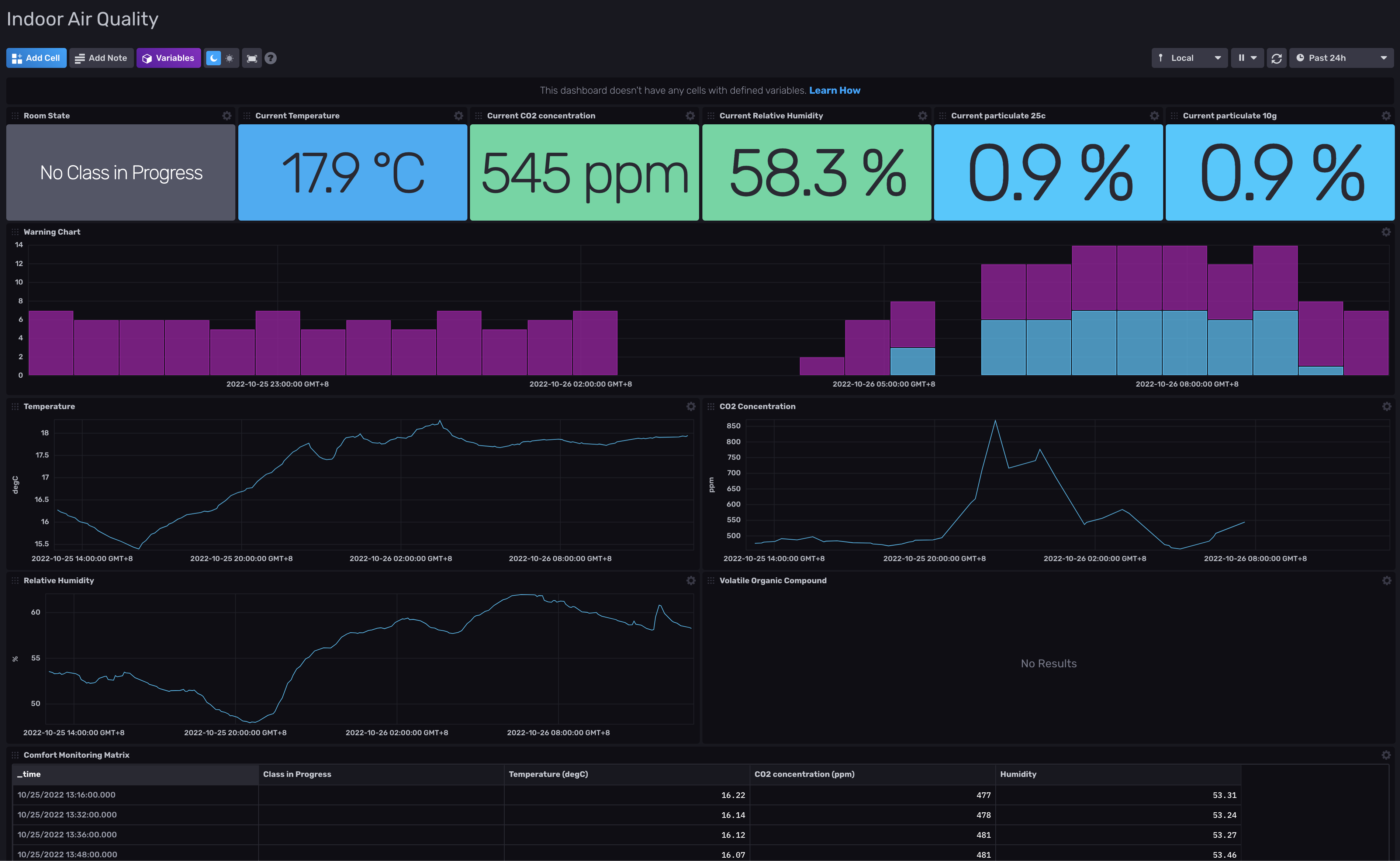
McMaster University / Dashboard example

See the building’s signals
in context.

This historical McMaster University dashboard brings room state, temperature, CO₂ and humidity together. It shows how building-system data can be viewed in one place, providing context for automation decisions.

Historical McMaster University indoor air quality dashboard showing room state, temperature, carbon dioxide concentration and relative humidity with time-series charts.
Historical dashboard from October 2022. Shown as an integration and monitoring example, not a measurement of energy savings. Select the image to view it at full size.
Start with the systems you have

Turn occupancy into
your next automation.

Tell us how you measure occupancy and which systems run your spaces. We’ll help you explore what you can connect and automate with PlaceOS.

Discuss your building →